

Guardrails Configuration#
This section describes how to configure guardrails in the config.yml file to control LLM behavior.
The rails Key#
The rails key defines which guardrails are active and their configuration options.
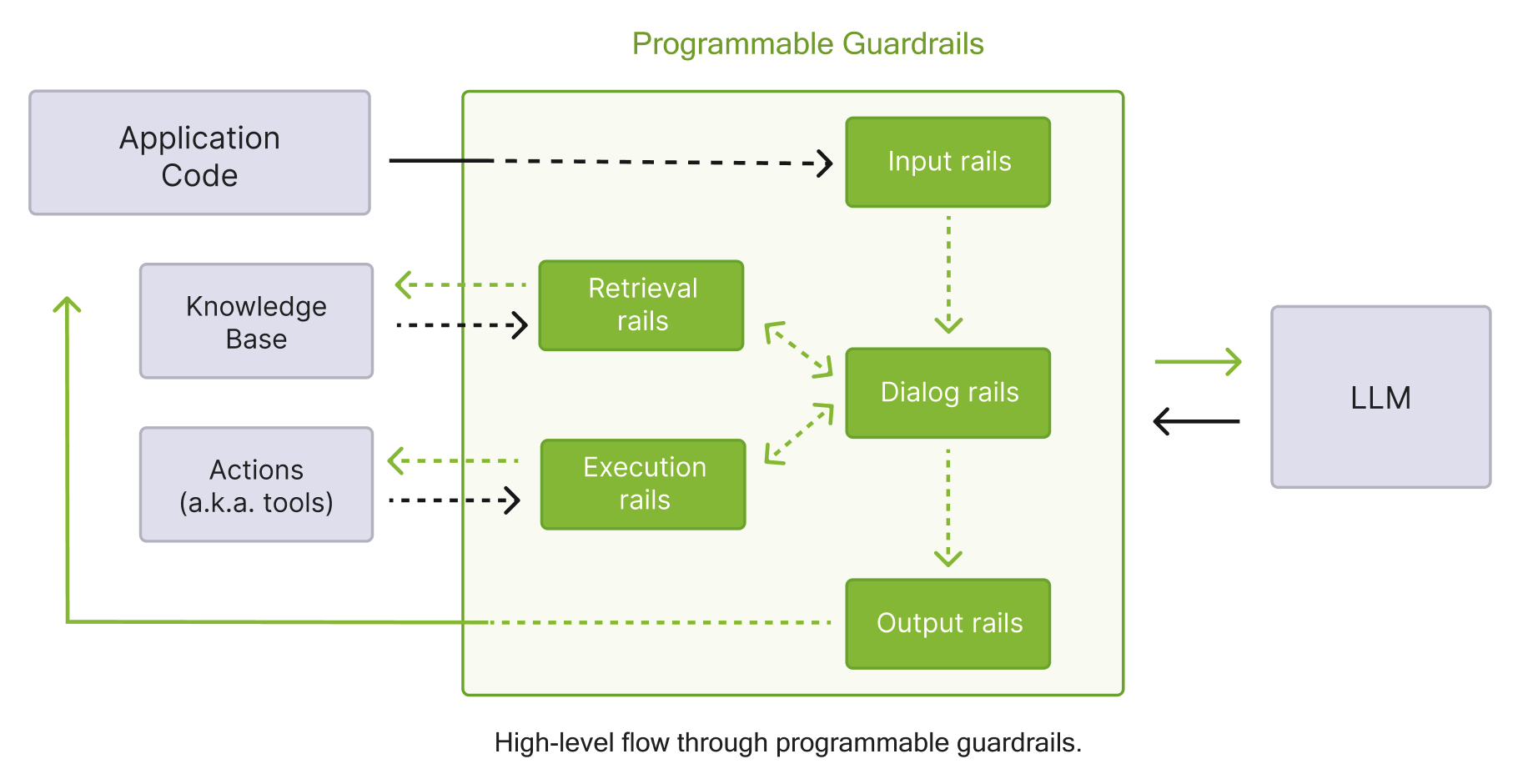
Rails are organized into five categories based on when they trigger during the guardrails process.
Rail Categories#
The following table summarizes the different rail categories and their trigger points.
Category |
Trigger Point |
Purpose |
|---|---|---|
Input rails |
When user input is received |
Validate, filter, or modify user input |
Retrieval rails |
After RAG retrieval completes |
Process retrieved chunks |
Dialog rails |
After canonical form is computed |
Control conversation flow |
Execution rails |
Before/after action execution |
Control custom action calls |
Output rails |
When LLM generates output |
Validate, filter, or modify bot responses |
The following diagram shows the guardrails process described in the table above in detail.
Basic Configuration#
rails:
  input:
    flows:
      - self check input
      - jailbreak detection heuristics
      - mask sensitive data on input

  output:
    flows:
      - self check output
      - self check facts
      - check output sensitive data

  retrieval:
    flows:
      - check retrieval sensitive data
Input Rails#
Input rails process user messages before they reach the LLM:
rails:
  input:
    flows:
      - self check input                # LLM-based input validation
      - jailbreak detection heuristics  # Jailbreak detection
      - mask sensitive data on input    # PII masking
For a complete list of available input flows, refer to the Input Rails.
Output Rails#
Output rails process LLM responses before returning to users:
rails:
  output:
    flows:
      - self check output          # LLM-based output validation
      - self check facts           # Fact verification
      - self check hallucination   # Hallucination detection
      - mask sensitive data on output  # PII masking
For a complete list of available output flows, refer to the Output Rails.
Retrieval Rails#
Retrieval rails process chunks retrieved from the knowledge base:
rails:
  retrieval:
    flows:
      - check retrieval sensitive data
For a complete list of available retrieval flows, refer to the Retrieval Rails.
Dialog Rails#
Dialog rails control conversation flow after user intent is determined:
rails:
  dialog:
    single_call:
      enabled: false
      fallback_to_multiple_calls: true

    user_messages:
      embeddings_only: false
For a complete list of available dialog flows, refer to the Dialog Rails.
Execution Rails#
Execution rails control custom action and tool invocations:
rails:
  execution:
    flows:
      - check tool input
      - check tool output
Rail-Specific Configuration#
Configure options for specific rails using the config key:
rails:
  config:
    # Sensitive data detection settings
    sensitive_data_detection:
      input:
        entities:
          - PERSON
          - EMAIL_ADDRESS
          - PHONE_NUMBER
      output:
        entities:
          - PERSON
          - EMAIL_ADDRESS

    # Jailbreak detection settings
    jailbreak_detection:
      length_per_perplexity_threshold: 89.79
      prefix_suffix_perplexity_threshold: 1845.65

    # Fact-checking settings
    fact_checking:
      parameters:
        endpoint: "http://localhost:5000"
YAML Schema#
Complete guardrails configuration example:
rails:
  # Input validation
  input:
    flows:
      - self check input
      - jailbreak detection heuristics
      - mask sensitive data on input

  # Output validation
  output:
    flows:
      - self check output
      - self check facts

  # Retrieval processing
  retrieval:
    flows:
      - check retrieval sensitive data

  # Dialog behavior
  dialog:
    single_call:
      enabled: false

  # Rail-specific settings
  config:
    sensitive_data_detection:
      input:
        entities:
          - PERSON
          - EMAIL_ADDRESS
          - CREDIT_CARD
      output:
        entities:
          - PERSON
          - EMAIL_ADDRESS
Parallel Execution of Input and Output Rails#
You can configure input and output rails to run in parallel. This can improve latency and throughput.
IORails Engine#
The IORails engine is an optimized execution engine that runs NemoGuard input and output rails in parallel with dedicated model management. The IORails engine is an opt-in feature. By default, the NeMo Guardrails library uses the LLMRails engine.
Note
IORails is an early-release feature and currently does not support streaming, reasoning models, and telemetry as in LLMRails.
Supported Flows#
The IORails engine supports the following flows:
content safety check input/content safety check outputtopic safety check inputjailbreak detection model
When IORails is enabled and the configuration uses only these flows, the engine runs them in parallel.
Configurations that include custom flows, dialog rails, or other unsupported flows
silently fall back to the LLMRails engine and emit a warning. Pass require_iorails=True
to Guardrails(...) to raise a ValueError at initialization instead.
Enabling IORails#
To enable the IORails engine, set the NEMO_GUARDRAILS_IORAILS_ENGINE environment variable to 1:
NEMO_GUARDRAILS_IORAILS_ENGINE=1 nemoguardrails chat --config examples/configs/content_safety
When using the Python API, import the Guardrails class directly and pass use_iorails=True:
from nemoguardrails import Guardrails, RailsConfig

config = RailsConfig.from_path("./config")
# require_iorails=True ensures the engine is IORails (raises on fallback), so
# parallel execution is actually in effect — the whole reason for opting in here.
guardrails = Guardrails(config, use_iorails=True, require_iorails=True)
YAML-Based Parallel Execution#
You can also configure existing LLMRails flows to run in parallel using the parallel: True
option in the config.yml file. This approach works with any flow type and does not require
the IORails engine.
When to Use#
Use YAML-based parallel execution:
For I/O-bound rails such as external API calls to LLMs or third-party integrations.
If you have two or more independent input or output rails without shared state dependencies.
In production environments where response latency affects user experience and business metrics.
When Not to Use#
Avoid parallel execution:
For CPU-bound rails; it might not improve performance and can introduce overhead.
During development and testing for debugging and simpler workflows.
Configuration Example#
To enable parallel execution, set parallel: True in the rails.input and rails.output sections in the config.yml file.
Note
Input rail mutations can lead to erroneous results during parallel execution because of race conditions arising from the execution order and timing of parallel operations. This can result in output divergence compared to sequential execution. For such cases, use sequential mode.
The following is an example configuration for parallel rails using models from NVIDIA Cloud Functions (NVCF). When you use NVCF models, make sure that you export NVIDIA_API_KEY to access those models.
models:
  - type: main
    engine: nim
    model: meta/llama-3.1-70b-instruct
  - type: content_safety
    engine: nim
    model: nvidia/llama-3.1-nemoguard-8b-content-safety
  - type: topic_control
    engine: nim
    model: nvidia/llama-3.1-nemoguard-8b-topic-control

rails:
  input:
    parallel: True
    flows:
      - content safety check input $model=content_safety
      - topic safety check input $model=topic_control
  output:
    parallel: True
    flows:
      - content safety check output $model=content_safety
      - self check output
    streaming:
      enabled: True
      chunk_size: 200
      context_size: 50
      stream_first: True
Speculative Generation#
Speculative generation runs input-rail and main LLM response generation in parallel, rather than sequentially. If response generation takes longer than the input-rail latency, this hides the latency of the input-rail check. The tradeoff is that the main LLM will begin generating a response for unsafe requests, with a corresponding token cost. However, responses are always checked by output rails before being returned to the client so no unsafe responses will be seen.
When to use Speculative Generation#
In many applications, safe requests are much more likely than unsafe requests. Speculative generation takes advantage of this by assuming all requests are safe for generation. Assuming a 2% rate of unsafe requests, the remaining 98% of safe requests will hide the input-rail latency by running in parallel with response generation. The cost of this latency saving is that tokens for the 2% of unsafe requests will be generated and then discarded. To decide whether Speculative Generation makes sense for your use-case, explore the unsafe request rate and potential latency savings.
Experimental Feature
Speculative generation currently requires the opt-in IORails engine.
To enable IORails, set NEMO_GUARDRAILS_IORAILS_ENGINE=1.
Speculative generation is supported only for non-streaming requests (generate_async).
When speculative generation is enabled, streaming requests (stream_async) fall back to sequential execution and emit a warning.
How It Works#
Without speculative generation, the IORails engine runs the input rails first and only starts the main LLM call once the input is determined to be safe:
Run input rails on the user message. If the input is unsafe, return the refusal message and stop.
If the input is safe, generate a response from the main LLM.
Run output rails on the LLM response. If the output is unsafe, return the refusal message and stop.
Return the response.
With speculative generation enabled, the input rails and the main LLM call start at the same time and race to completion:
Start the input rails and the main LLM call in parallel.
Wait for whichever finishes first, then resolve the race:
If the input rails finish first and the input is unsafe, cancel the LLM call and return the refusal message.
If the input rails finish first and the input is safe, wait for the LLM call to finish.
If the LLM call finishes first, wait for the input-rail verdict; discard the response and return the refusal message if the input is unsafe.
Run output rails on the LLM response.
Return the response, or the refusal message if output rails blocked it.
The engine handles three outcomes:
Outcome |
Behavior |
|---|---|
Input rails finish first, input is unsafe |
The main LLM call is cancelled. The user receives the refusal message. |
Input rails finish first, input is safe |
The engine waits for the main LLM call to finish, then runs output rails. |
Main LLM finishes first |
The engine waits for the input-rail verdict. If unsafe, the generated response is discarded and the user receives the refusal message. |
Output rails always run after the main LLM completes. Speculative generation does not change the output-rail path.
Configuration Example#
To enable speculative generation, set speculative_generation: True under rails.input in the config.yml file.
Speculative generation requires the IORails engine; see IORails Engine for how to enable it.
models:
  - type: main
    engine: nim
    model: meta/llama-3.1-70b-instruct
  - type: content_safety
    engine: nim
    model: nvidia/llama-3.1-nemoguard-8b-content-safety

rails:
  input:
    speculative_generation: True
    flows:
      - content safety check input $model=content_safety
  output:
    flows:
      - content safety check output $model=content_safety
speculative_generation and parallel can be combined.
Input rails will run in parallel with each other and concurrently with the main LLM call.