

Configuration YAML Schema Reference#
This reference documents all configuration options for config.yml, derived from the authoritative Pydantic schema in nemoguardrails/rails/llm/config.py.
Models Configuration#
The models key defines LLM providers and models used by NeMo Guardrails.
Model Schema#
models:
  - type: main                    # Required: Model type
    engine: openai                # Required: LLM provider
    model: gpt-4                  # Required: Model name
    mode: chat                    # Optional: "chat" or "text" (default: "chat")
    api_key_env_var: OPENAI_KEY   # Optional: Environment variable for API key
    parameters:                   # Optional: Provider-specific parameters
      temperature: 0.7
      max_tokens: 1000
    cache:                        # Optional: Caching configuration
      enabled: false
      maxsize: 50000
Model Attributes#
Attribute |
Type |
Required |
Description |
|---|---|---|---|
|
string |
Environment variable containing API key |
|
|
object |
Cache configuration for this model |
|
|
string |
✓ |
LLM provider (see Engines) |
|
string |
Completion mode: |
|
|
string |
✓ |
Model name (can also be in |
|
object |
Provider-specific parameters. For engines served by the built-in client (any OpenAI-compatible endpoint), the runtime forwards |
|
|
string |
✓ |
Model identifier (see Model Types) |
Model Types#
The type field is a free-form string identifier. Certain types have special handling in the runtime, while custom types can be defined and referenced in flows via $model=<type>.
Reserved Types#
These types have special handling in the NeMo Guardrails runtime:
Type |
Description |
|---|---|
|
Embedding model for knowledge base and similarity search |
|
Jailbreak detection model (used with NIM) |
|
Primary application LLM for conversation |
Commonly-Used Types#
The following types are commonly used with guardrails:
Type |
Description |
Usage Example in Flows |
|---|---|---|
|
Content safety model |
|
|
Llama Guard content moderation |
|
|
Topic control model |
|
Custom Types#
You can define any custom type and reference it in flows. For example:
models:
  - type: my_safety_model
    engine: self-hosted
    model: my-org/custom-safety-model

rails:
  input:
    flows:
      - content safety check input $model=my_safety_model
The runtime validates that any $model=<type> reference in flows has a matching model defined in the configuration.
Engines#
Starting with version 0.22, NeMo Guardrails serves engines through either the built-in OpenAI-compatible client or LangChain. Use the built-in client whenever the underlying wire protocol is OpenAI-compatible. Opt into LangChain only for engines whose API is not OpenAI-compatible, such as Vertex AI, Anthropic, Cohere, and the in-process Hugging Face pipeline. For the full mapping see Inference Providers; for migration recipes see Migrating to 0.22.
Built-in Engines#
These engines work with pip install nemoguardrails and do not require extra provider packages. Pass parameters.base_url to point at a self-hosted or alternative endpoint.
Engine |
Description |
|---|---|
|
NVIDIA NIM microservices |
|
Alias for |
|
Ollama OpenAI-compatible endpoint at |
|
OpenAI public API or any OpenAI-compatible endpoint using |
For OpenAI-compatible providers without a dedicated engine entry (vLLM, TGI, OpenRouter, Together.ai, Fireworks.ai, Groq, DeepSeek, llama.cpp server, and similar), use engine: openai with parameters.base_url and parameters.api_key.
LangChain Engines#
To use one of these engines, set NEMOGUARDRAILS_LLM_FRAMEWORK=langchain and install the matching langchain-* provider package.
Engine |
Description |
|---|---|
|
Anthropic Claude models |
|
Azure OpenAI models (deployment-name URL plus |
|
Cohere models |
|
Google Generative AI through LangChain (requires |
|
Hugging Face Inference Endpoints (default text-generation schema; if your endpoint exposes |
|
Hugging Face Hub models |
|
In-process Hugging Face pipeline |
|
Generic self-hosted LangChain wrapper |
|
TensorRT-LLM in-process |
|
Google Vertex AI through LangChain (requires |
|
Legacy LangChain wrapper for vLLM. For new configs, prefer |
Embedding Engines#
Engine |
Description |
|---|---|
|
FastEmbed (default) |
|
NVIDIA NIM embeddings |
|
OpenAI embeddings |
Model Cache Configuration#
models:
  - type: content_safety
    engine: nim
    model: nvidia/llama-3.1-nemotron-safety-guard-8b-v3
    cache:
      enabled: true
      maxsize: 50000
      stats:
        enabled: false
        log_interval: null
Attribute |
Type |
Default |
Description |
|---|---|---|---|
|
boolean |
|
Enable caching for this model |
|
integer |
|
Maximum cache entries |
|
boolean |
|
Enable cache statistics tracking |
|
float |
|
Seconds between stats logging |
Rails Configuration#
The rails key configures guardrails that control LLM behavior.
Rails Schema#
rails:
  input:
    parallel: false
    flows:
      - self check input
      - check jailbreak

  output:
    parallel: false
    flows:
      - self check output
    streaming:
      enabled: false
      chunk_size: 200
      context_size: 50
      stream_first: true

  retrieval:
    flows:
      - check retrieval sensitive data

  dialog:
    single_call:
      enabled: false
      fallback_to_multiple_calls: true
    user_messages:
      embeddings_only: false

  actions:
    instant_actions: []

  tool_output:
    flows: []
    parallel: false

  tool_input:
    flows: []
    parallel: false

  config:
    # Rail-specific configurations
Rail Types#
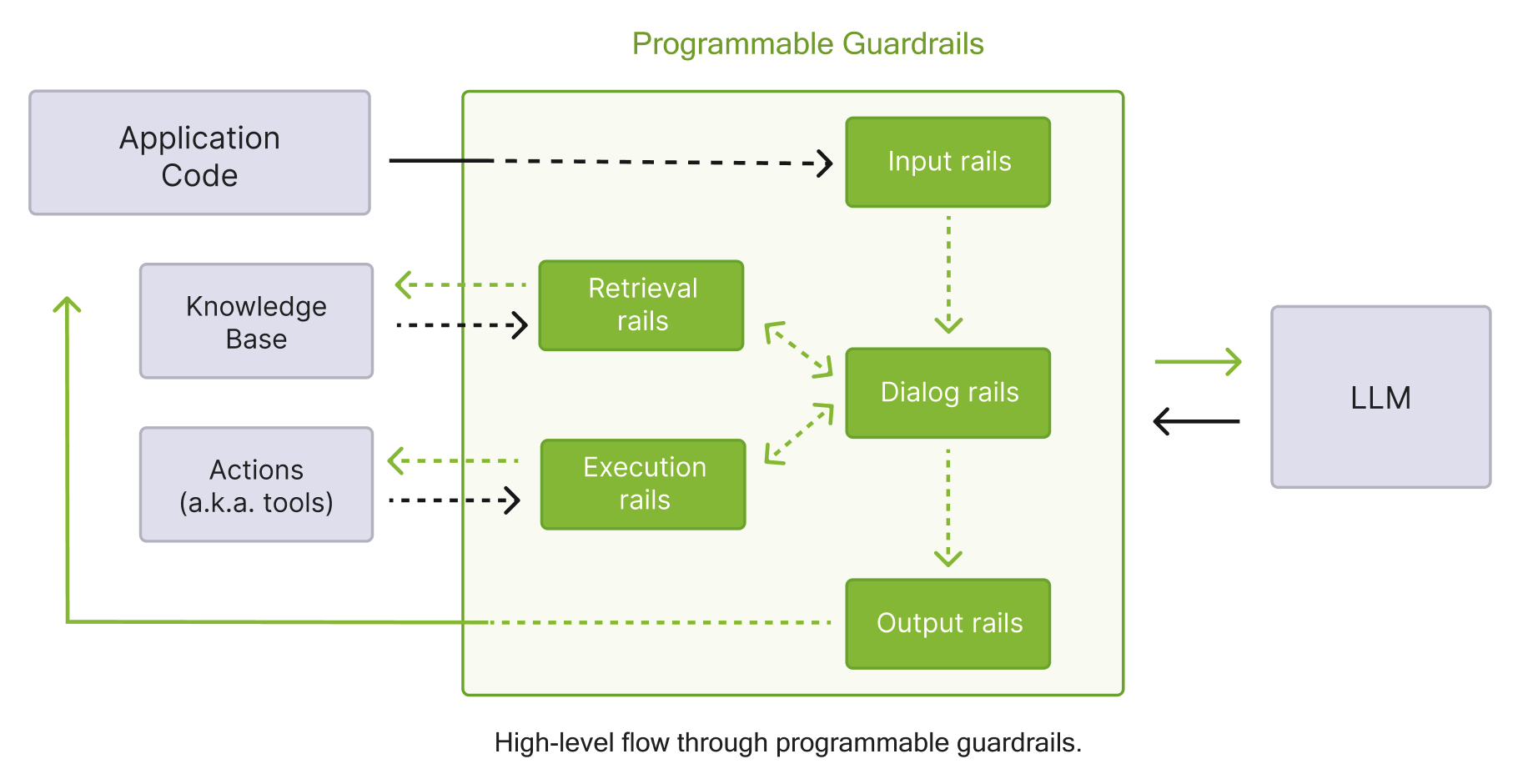
The following table summarizes the available rail types and their trigger points.
Rail Type |
Trigger Point |
Purpose |
|---|---|---|
Dialog rails |
After canonical form is computed |
Control conversation flow |
Execution rails |
Before/after action execution |
Control tool and action calls |
Input rails |
When user input is received |
Validate, filter, or modify user input |
Output rails |
When LLM generates output |
Validate, filter, or modify bot responses |
Retrieval rails |
After RAG retrieval completes |
Process retrieved chunks |
The following diagram shows the guardrails process described in the table above in detail.
Input Rails#
Process user messages before they reach the LLM.
rails:
  input:
    parallel: false      # Execute flows in parallel
    flows:
      - self check input
      - check jailbreak
      - mask sensitive data on input
Attribute |
Type |
Default |
Description |
|---|---|---|---|
|
list |
|
Names of flows that implement input rails |
|
boolean |
|
Execute input rails in parallel |
Built-in Input Flows#
Flow |
Description |
|---|---|
|
NVIDIA content safety model |
|
Detect and block PII |
|
Jailbreak detection heuristics |
|
NIM-based jailbreak detection |
|
LlamaGuard content moderation |
|
Mask PII in user input |
|
LLM-based policy compliance check |
|
Topic control model |
Output Rails#
Process LLM responses before returning to users.
rails:
  output:
    parallel: false
    flows:
      - self check output
      - self check facts
    streaming:
      enabled: false
      chunk_size: 200
      context_size: 50
      stream_first: true
Attribute |
Type |
Default |
Description |
|---|---|---|---|
|
list |
|
Names of flows that implement output rails |
|
boolean |
|
Execute output rails in parallel |
|
object |
Streaming output configuration |
Output Streaming Configuration#
Attribute |
Type |
Default |
Description |
|---|---|---|---|
|
integer |
|
Tokens per processing chunk |
|
integer |
|
Tokens carried from previous chunk |
|
boolean |
|
Enable streaming mode |
|
boolean |
|
Stream before applying output rails |
Built-in Output Flows#
Flow |
Description |
|---|---|
|
NVIDIA content safety model |
|
Injection detection (SQL, XSS, code, template) |
|
LlamaGuard content moderation |
|
Mask PII in output |
|
Fact verification |
|
Hallucination detection |
|
LLM-based policy compliance check |
Retrieval Rails#
Process chunks retrieved from knowledge base.
rails:
  retrieval:
    flows:
      - check retrieval sensitive data
Dialog Rails#
Control conversation flow after user intent is determined.
rails:
  dialog:
    single_call:
      enabled: false
      fallback_to_multiple_calls: true
    user_messages:
      embeddings_only: false
      embeddings_only_similarity_threshold: null
      embeddings_only_fallback_intent: null
Attribute |
Type |
Default |
Description |
|---|---|---|---|
|
boolean |
|
Use single LLM call for intent + response |
|
boolean |
|
Fall back if single call fails |
|
boolean |
|
Use only embeddings for intent matching |
Execution Rails#
Control tool and action invocations.
Action Rails#
Control custom action and tool invocations.
rails:
  actions:
    instant_actions:
      - action_name_1
      - action_name_2
Tool Rails#
Control tool input/output processing.
rails:
  tool_output:
    flows:
      - validate tool parameters
    parallel: false

  tool_input:
    flows:
      - filter tool results
    parallel: false
Rails Config Section#
The rails.config section contains configuration for specific built-in rails.
Jailbreak Detection#
rails:
  config:
    jailbreak_detection:
      # Heuristics-based detection
      server_endpoint: null
      length_per_perplexity_threshold: 89.79
      prefix_suffix_perplexity_threshold: 1845.65

      # NIM-based detection
      nim_base_url: "http://localhost:8000/v1/"
      nim_server_endpoint: "classify"
      api_key_env_var: "JAILBREAK_KEY"
Attribute |
Type |
Default |
Description |
|---|---|---|---|
|
string |
|
API key (not recommended) |
|
string |
|
Environment variable for API key |
|
float |
|
Length/perplexity threshold |
|
string |
|
NIM base URL (e.g., |
|
string |
|
NIM endpoint path |
|
float |
|
Prefix/suffix perplexity threshold |
|
string |
|
Heuristics model endpoint |
Sensitive Data Detection (Presidio)#
rails:
  config:
    sensitive_data_detection:
      recognizers: []
      input:
        entities:
          - PERSON
          - EMAIL_ADDRESS
          - PHONE_NUMBER
          - CREDIT_CARD
        mask_token: "*"
        score_threshold: 0.2
      output:
        entities:
          - PERSON
          - EMAIL_ADDRESS
      retrieval:
        entities: []
Attribute |
Type |
Default |
Description |
|---|---|---|---|
|
list |
|
Entity types to detect |
|
string |
|
Token for masking |
|
float |
|
Detection confidence threshold |
|
list |
|
Custom Presidio recognizers |
Injection Detection#
rails:
  config:
    injection_detection:
      injections:
        - sqli
        - template
        - code
        - xss
      action: reject    # "reject" or "omit"
      yara_path: ""
      yara_rules: {}
Attribute |
Type |
Default |
Description |
|---|---|---|---|
|
string |
|
Action: |
|
list |
|
Injection types: |
|
string |
|
Custom YARA rules path |
|
object |
|
Inline YARA rules |
Fact Checking#
rails:
  config:
    fact_checking:
      parameters:
        endpoint: "http://localhost:5000"
      fallback_to_self_check: false
Content Safety#
rails:
  config:
    content_safety:
      multilingual:
        enabled: false
        refusal_messages:
          en: "Sorry, I cannot help with that."
          es: "Lo siento, no puedo ayudar con eso."
The multilingual feature supports the following languages:
Language |
Code |
|---|---|
Arabic |
|
Chinese |
|
English |
|
French |
|
German |
|
Hindi |
|
Japanese |
|
Spanish |
|
Thai |
|
If the detected language is not in this list, English is used as the fallback. For more details, refer to Multilingual Content Safety.
Third-Party Integrations#
AutoAlign#
rails:
  config:
    autoalign:
      parameters: {}
      input:
        guardrails_config: {}
      output:
        guardrails_config: {}
For more information, refer to AutoAlign Integration.
Patronus#
rails:
  config:
    patronus:
      input:
        evaluate_config:
          success_strategy: all_pass  # or any_pass
          params: {}
      output:
        evaluate_config:
          success_strategy: all_pass
          params: {}
For more information, refer to Patronus Evaluate API Integration.
Clavata#
rails:
  config:
    clavata:
      server_endpoint: "https://gateway.app.clavata.ai:8443"
      policies: {}
      label_match_logic: ANY  # or ALL
      input:
        policy: "policy_alias"
        labels: []
      output:
        policy: "policy_alias"
        labels: []
For more information, refer to Clavata Integration.
Pangea AI Guard#
rails:
  config:
    pangea:
      input:
        recipe: "recipe_key"
      output:
        recipe: "recipe_key"
For more information, refer to Pangea AI Guard Integration.
Trend Micro#
rails:
  config:
    trend_micro:
      v1_url: "https://api.xdr.trendmicro.com/beta/aiSecurity/guard"
      api_key_env_var: "TREND_MICRO_API_KEY"
For more information, refer to Trend Micro Integration.
Cisco AI Defense#
rails:
  config:
    ai_defense:
      timeout: 30.0
      fail_open: false
For more information, refer to Cisco AI Defense Integration.
Private AI#
rails:
  config:
    private_ai_detection:
      server_endpoint: "http://localhost:8080/process/text"
      input:
        entities: []
      output:
        entities: []
      retrieval:
        entities: []
For more information, refer to Private AI Integration.
Fiddler Guardrails#
rails:
  config:
    fiddler:
      fiddler_endpoint: "http://localhost:8080/process/text"
      safety_threshold: 0.1
      faithfulness_threshold: 0.05
For more information, refer to Fiddler Guardrails Integration.
Guardrails AI#
rails:
  config:
    guardrails_ai:
      input:
        validators:
          - name: toxic_language
            parameters:
              threshold: 0.5
            metadata: {}
      output:
        validators:
          - name: pii
            parameters: {}
For more information, refer to Guardrails AI Integration.
Prompts Configuration#
Define prompts for LLM tasks.
prompts:
  - task: self_check_input
    content: |
      Your task is to check if the user input is safe.
      User input: {{ user_input }}
      Answer [Yes/No]:
    output_parser: null
    max_length: 16000
    max_tokens: null
    mode: standard
    stop: null
    models: null    # Restrict to specific engines/models
Attribute |
Type |
Default |
Description |
|---|---|---|---|
|
string |
Prompt template (mutually exclusive with |
|
|
integer |
|
Maximum prompt length (characters) |
|
integer |
|
Maximum response tokens |
|
list |
Chat messages (mutually exclusive with |
|
|
string |
|
Prompting mode |
|
list |
|
Restrict to engines/models (e.g., |
|
string |
|
Output parser name |
|
list |
|
Stop tokens |
|
string |
✓ |
Task identifier |
Available Tasks#
The following table lists all available tasks you can specify to prompts.task.
Task |
Description |
|---|---|
|
General response generation (no dialog rails) |
|
Generate bot response |
|
Determine next conversation step |
|
Generate canonical user intent |
|
Verify factual accuracy of responses |
|
Detect hallucinations in responses |
|
Check if user input complies with policy |
|
Check if bot output complies with policy |
Available Prompt Message Types#
The following table lists all available message types you can specify to prompts.messages.type.
Type |
Description |
|---|---|
|
Assistant/bot message content |
|
Alias for |
|
System-level instructions |
|
User message content |
Other Configuration Options#
Instructions#
instructions:
  - type: general
    content: |
      You are a helpful assistant.
Sample Conversation#
sample_conversation: |
  user "Hello there!"
    express greeting
  bot express greeting
    "Hello! How can I assist you today?"
  user "What can you do for me?"
    ask about capabilities
  bot respond about capabilities
    "As an AI assistant, I can help you with a wide range of tasks."
Knowledge Base#
knowledge_base:
  folder: kb
  embedding_search_provider:
    name: default
    parameters: {}
    cache:
      enabled: false
Core Settings#
core:
  embedding_search_provider:
    name: default
    parameters: {}
Tracing#
tracing:
  enabled: false
  adapters:
    - name: FileSystem
  span_format: opentelemetry
  enable_content_capture: false
Streaming#
Deprecated since version v0.20.0: The top-level streaming field is a boolean that is no longer required. Use the stream_async() method directly instead. For output rail streaming configuration, see Output Streaming Configuration.
streaming: false
Import Paths#
import_paths:
  - path/to/shared/config
Complete Example#
The following YAML example demonstrates a complete config.yml file that wires together a main language model, a dedicated content safety model, and an embeddings model. It configures rails for input and output content safety checks, points to a local NIM service for jailbreak detection, defines a content safety prompt, provides general instructions for the assistant, and enables response streaming from both the main and content safety models.
models:
  # Main application LLM
  - type: main
    engine: nim
    model: meta/llama-3.1-70b-instruct
    parameters:
      temperature: 0.7

  # Content safety model
  - type: content_safety
    engine: nim
    parameters:
      base_url: "http://localhost:8000/v1"
      model_name: "nvidia/llama-3.1-nemotron-safety-guard-8b-v3"

  # Embeddings
  - type: embeddings
    engine: FastEmbed
    model: all-MiniLM-L6-v2

rails:
  input:
    flows:
      - content safety check input $model=content_safety

  output:
    flows:
      - content safety check output $model=content_safety
    streaming:
      enabled: true

  config:
    jailbreak_detection:
      nim_base_url: "http://localhost:8001/v1/"

prompts:
  - task: content_safety_check_input $model=content_safety
    content: |
      Check if this content is safe: {{ user_input }}
    output_parser: nemoguard_parse_prompt_safety
    max_tokens: 50

instructions:
  - type: general
    content: |
      You are a helpful, harmless, and honest assistant.

streaming:
  enabled: true