Token-efficient analysis of production traces
Finding better signals in agent traces.




Why NeMo Compass?
One of the most valuable ways to improve an agent is to learn from its production behavior. As the volume of agent data and the complexity of potential issues increase, it gets harder to analyze production traces effectively and affordably.
How can developers analyze large volumes of traces across a wide range of dimensions without spending a model token on every trace? How can they use that analysis to improve an agent's cost, quality, and safety? We're treating those as research questions worth solving. We're introducing NeMo Compass as an early-stage project where we can test those questions and share methods others can use in their products and pipelines.
Below, we explain how we see the problem, how we're approaching it, and where we expect to go next.
The value of automated trace analysis
Few agents accomplish every task perfectly, safely, and as cheaply as possible. There's nearly always an opportunity to improve.
Evals are a proven path to improving an agent quantitatively, but they have limits. Offline evals tell you how an agent handles the cases in a test set. Once an agent is live, production brings different tasks and new failure modes. A strong offline eval score can give false confidence about live performance.
Production traces let you check what users actually asked the agent to do, how it responded, and where things went wrong.
The hard part is making sense of that data at scale. A single run might have dozens of model calls, tool results, retries, and user corrections. Reading a few traces by hand is useful, but reading hundreds of thousands or millions is not an option. Which issues are common? Which are worth fixing? How do you find important improvement opportunities outside the sample you happened to review?
There is a growing list of products that help with trace analysis, and many developers use coding agents to investigate their agent runs. We think there is room to study the underlying techniques more rigorously. Which analyses have the greatest impact on improving an agent? Which methods reliably find useful issues without sending every trace to a frontier model? How do you check whether a finding holds up and leads to a better agent?
Breaking down trace analysis
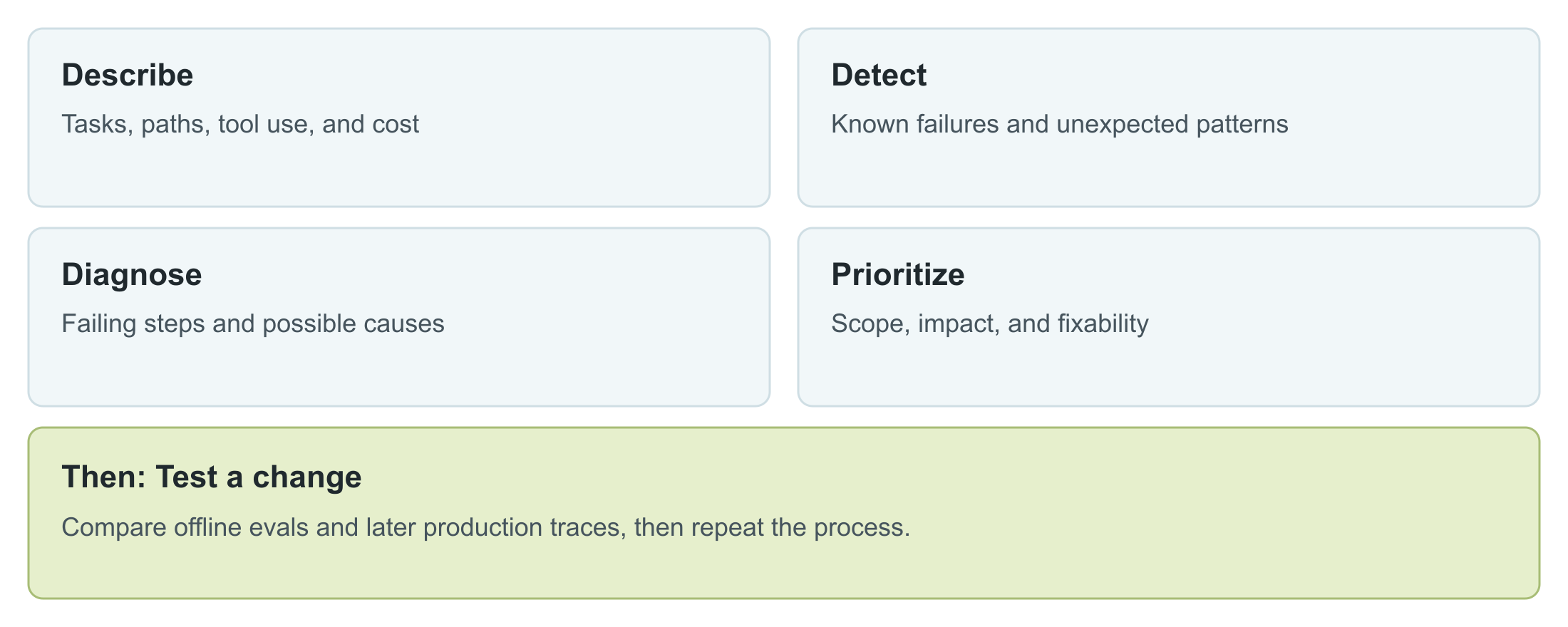
When someone says they want to “analyze traces,” it helps to ask what decision they need to make. We see at least four related jobs:
- Describe behavior. What are users asking for? Which tools does the agent call? How do task mix, paths through the agent, latency, and cost change across versions or customer cohorts? These questions may or may not point to failures, but they're often useful to answer.
- Detect issues. Did a tool call fail, and how often? Did the agent violate a requirement or receive negative feedback? You can check for these if you know what to look for. You also need ways to find repeated mistakes or unusual behavior that no one specified in advance.
- Diagnose failures. Where did a run first go off track, and what caused it? A trace might show a failed call without showing whether the cause was the agent, a tool contract, or missing state. A useful diagnosis makes it easier for developers and their coding agents to implement a fix.
- Prioritize improvement. A common problem is not necessarily the one to fix first. Teams need to weigh its impact, including how many users it affects and how costly it is, against whether they can change the agent to address it. A finding might lead to a tool fix, a prompt change, or an updated eval to catch regressions.
These jobs connect directly to testing an agent. If production traces reveal a valuable task missing from an eval set, add it. If an eval score changes, inspect the runs behind it. If you diagnose a production failure, turn it into a regression test. Then keep watching live traffic: the next set of traces may expose something new.
Finding signal at production scale
Developers can give a coding agent a batch of traces and ask what went wrong. That can be a useful start, but context windows and model costs usually force a sampling approach. A rare failure can get lost in traces you never review. Prompting an agent to review traces also biases it toward the issues you already thought to ask about. That helps with known problems and makes it easier to miss unknown ones.
Different questions need different tools. Deterministic code can check every recorded tool call for invalid arguments or missing results. Embeddings and compact features can help select conversations or outliers for closer inspection. Existing eval scores can point to failures worth investigating. An LLM can interpret context that a rule cannot. Each method has limits: an outlier is not automatically a bug, a low score does not explain its cause, and a missing trace field may make a question impossible to answer.
Our approach is to scan broadly where cheap checks work, spend model tokens where context matters, and verify a candidate against its source traces before calling it a finding worth attention. We want to know how many distinct, useful issues a method finds for a given goal and review budget, and what it misses.
What we're testing with NeMo Compass
The first Compass release focuses on finding recurring issues in agent traces. Loaders normalize traces from common data stores and file formats, including ATIF. Five independent Compass Signals look for different kinds of evidence and return candidate issues with supporting trace IDs. You can choose the signals that address problems you care about and fit your data. For example, you can omit user sentiment if your agent has no human users.
- Tool Issues checks for invalid arguments, failed calls, missing results, and unproductive retries.
- User Sentiment uses embeddings to select traces with complaints for closer review.
- Grader Failures starts with recorded eval scores and feedback, then looks at the related runs.
- Ethos Divergence compares agent behavior with written business requirements from an ETHOS.md file.
- Anomalies and Patterns looks for statistical outliers, repeated trajectories, and failure signatures that a predefined issue list might miss.
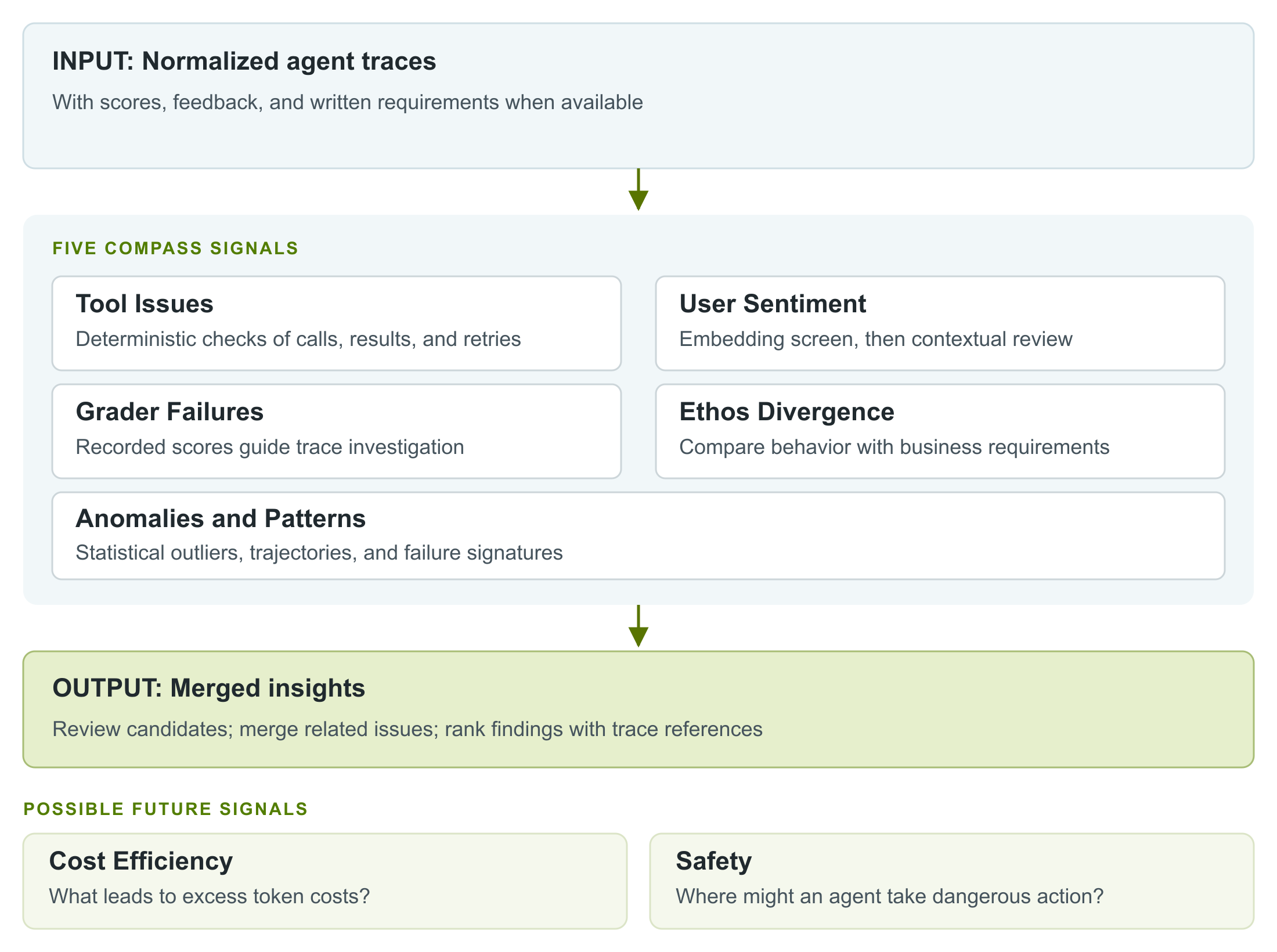
Why split them up? Checking a tool contract calls for a different method than interpreting a user complaint. Grouping unusual trajectories can surface anomalies worth investigation, but it does not prove those runs failed.
Compass reviews candidate issues against their original traces, combines related ones, and ranks findings with trace references. Optional read-only checks against the agent's code can help improve signals from Compass. Model judgment is still involved, so developers need to inspect the findings.
We want developers to be able to try these methods and, when useful, incorporate them into existing trace-analysis products or internal workflows. Compass can currently load traces from common stores and files. At this point it is meant to be an applied research project, not a standalone observability product.
How will we know if it helps?
For a known failure, you can label examples and measure precision, recall, coverage, and cost. Discovery is harder because you don't know every issue in a fresh dataset ahead of time. We also need to review the distinct issue families a method surfaces, inspect its evidence, and look deliberately for important misses. A plausible root cause needs its own check. The real test is whether acting on a finding improves the agent without introducing regressions.
We start by seeding a large synthetic trace dataset with known issues, then measuring precision and recall for those issues. That lets us compare methods on the same traces with the same goals and budgets. We care about verified issues found, important issues missed, duplicate or unsupported findings, tokens and dollars spent, and time to a finding a developer can act on. Later, we plan to ask whether a change prompted by a finding improves held-out evals or a production cohort. We don't yet have a benchmark that answers all of this, but building credible comparisons is part of the work.
Try it and tell us what you find
Compass is early. Its APIs and output formats may change, and it is not yet intended for production use. We know it's already generating useful results, and we're eager to get feedback from interested developers and researchers.
The easiest way to try it is on traces you already have. See the Getting Started instructions. You can also test with example traces.
If an NVIDIA contact shared the preview, send feedback through that contact. Otherwise, use the NVIDIA Developer contact form with NeMo Compass research preview feedback in the subject. Please do not send raw traces, prompts, credentials, or user data in an initial message.