Create Your First Retrieval Bundle
Generate retrieval queries from a page of NVIDIA hardware documentation, inspect their supporting evidence, and identify which training views preserve that evidence. You need basic command-line and YAML knowledge. No document extraction is needed.
The example uses printed page 16 (PDF page 22) of the NVIDIA DGX B200 User Guide, dated September 8, 2026. It checks generation and inspection using real source material. One page is not enough to assess training or retrieval quality.
1. Install and Configure Models
Use a repository checkout containing the multimodal workflow, Python 3.10 or
later, an active Python environment, and uv. From the repository root, run:
uv pip install ./plugins/data-designer-retrieval-sdg
python -m data_designer_retrieval_sdg.multimodal --help
cp plugins/data-designer-retrieval-sdg/docs/assets/first-run/sdg.yaml ./sdg.yaml
The configuration selects
nvidia/nemotron-3.5-super-vl-120b-a12b
from the NVIDIA API Catalog for both generation and judging. Both roles use the
public base URL https://integrate.api.nvidia.com/v1.
Generate an API key from the model's catalog page and set it in your shell:
Replace the placeholder with your API key. The YAML stores the environment variable name, not the credential. The model and endpoint are already configured.
The example uses the model card's vision sampling settings, high reasoning effort, and a per-request output budget of 16,384 tokens for reasoning and the structured response. Refer to the API reference for the hosted request options. If you change models or deployments, update both roles using Model Settings.
Keep output_dir pointed at a new directory. An existing completed or interrupted
run requires the resume procedure.
The downloadable configuration uses the default
query profiles by omitting instructions and instructions_per_context.
For each context that reaches generation, the sampler requests one text, one
figure, and one table query. It varies query type, format, and answerability using
the configured seed. Unsupported tasks can abstain.
The configuration uses one source per context and one concurrent request to make the first run easier to inspect. These settings do not impose an aggregate request, token, or spending limit. Monitor usage through your provider.
2. Inspect the Supplied Page
The source file uses JSON Lines (JSONL): one JSON
object per retrievable source unit. This example has one unit,
dgx-b200-page-16, containing extracted text and a rendered page image:
| Content | What It Provides |
|---|---|
| Extracted text | The purposes of NVIDIA System Management (NVSM) and Data Center GPU Management (DCGM), plus other DGX OS software components. |
| Page image | The system topology, including CPU/GPU groupings and connections, and the software text below it. |
Image paths resolve relative to sources.jsonl. Configuration paths resolve from
where you run the command. Keep running from the repository root with the supplied
configuration. If you download the files separately, keep
dgx-b200-page-16.png beside
sources.jsonl and update sources_file in your configuration.
The supplied image is a direct render of the PDF page. The text preserves the extracted wording from sections 1.3 and 1.4, with line wrapping normalized and running headers and footers removed. The image also retains the end of the preceding networking section at the top of the page. The source provenance records the original URL, document date, page numbers, preparation steps, and file checksums. PDF extraction and rendering are already complete for this example; the plugin consumes the prepared JSONL and image.
The topology diagram contains visual relationships that are absent from the extracted text. The image also includes the software prose, so some facts are available through both representations:
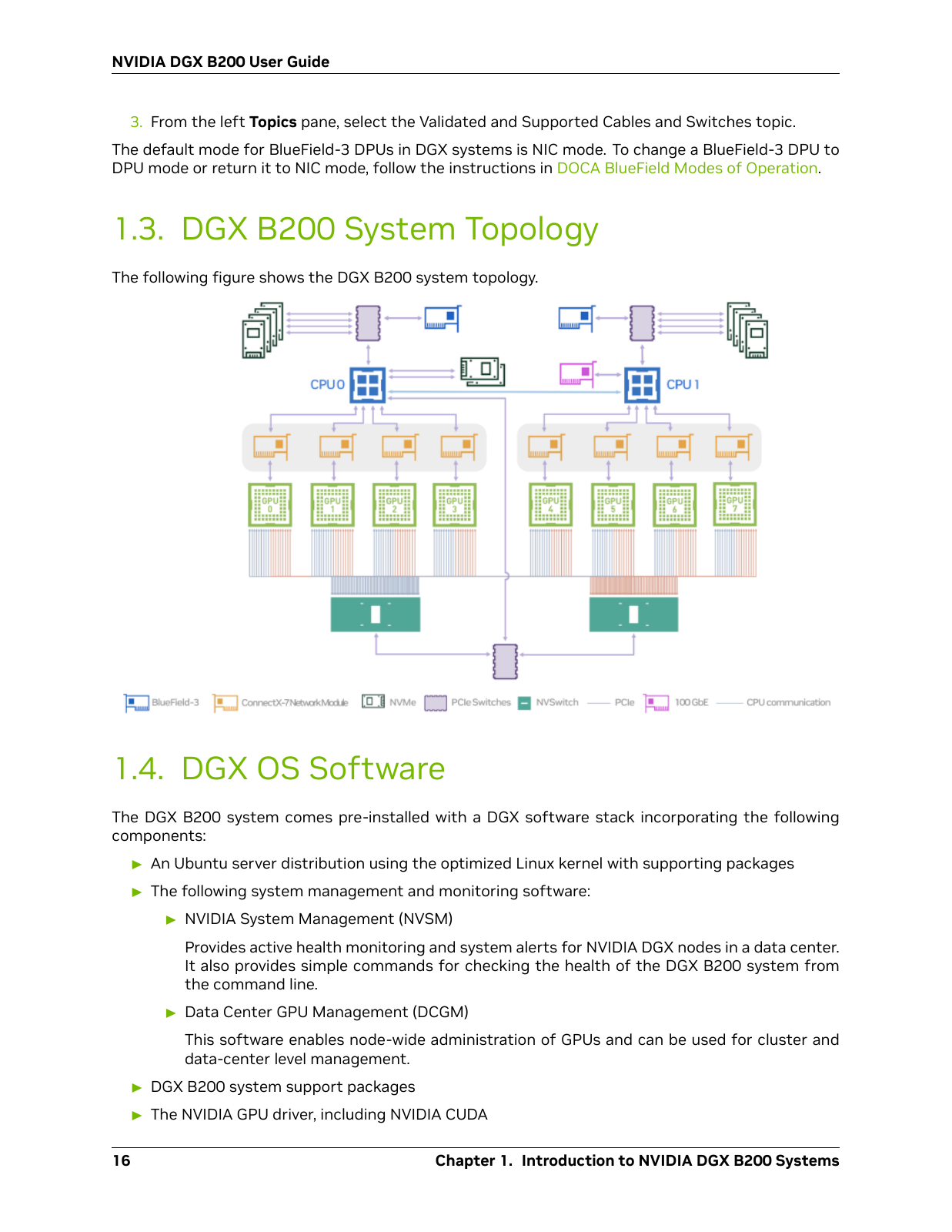
The default profiles can draw on the software text and the topology diagram. A table task can abstain if it cannot find suitable table evidence. Summary and query checks can also reject candidates. Three requested slots do not imply three accepted queries.
3. Generate and Inspect Results
Run the configuration:
A completed run prints the path to
runs/first-retrieval-bundle/bundle/generation_result.json. If no queries pass,
the run fails without a completed handoff. Preserve its output and follow
Troubleshoot a Small Run.
Save the following as review_bundle.py in the repository root to inspect counts
and view eligibility:
import json
from pathlib import Path

bundle = Path("runs/first-retrieval-bundle/bundle")
report = json.loads((bundle / "report.json").read_text())
print("Requested:", report["requested_slots"])
print("Abstained:", report["abstentions"])
print("Generated:", report["candidate_records"])
print("Accepted:", report["accepted_query_ids"])
print("Rejections:", report["rejection_reasons"])
print("Views:", report["views"])
Run the inspection script from the repository root:
Open candidate_diagnostics.jsonl in the same bundle directory and compare the
queries and supporting evidence with the supplied sources. Counts, wording, and
split assignments depend on model responses. Use the following steps to inspect
the records from your run.
4. Follow a Query From Source to View
Append the following to review_bundle.py to display one accepted query, its
requested profile, and the recorded supporting evidence:
records = [
    json.loads(line)
    for line in (bundle / "candidate_diagnostics.jsonl").read_text().splitlines()
]
candidate = next(record for record in records if record["accepted"])
fields = (
    "query_id",
    "query",
    "requested_instruction",
    "evidence_modality",
    "localization",
    "quote_verification",
)
print(json.dumps({field: candidate[field] for field in fields}, indent=2))
Run python review_bundle.py again. Compare the requested profile with the query
and each entry in localization.supports:
- Find each
unit_idinsources.jsonl. Compare text quotations with the original text and visual explanations with the page image. - Check whether the recorded evidence supports the query.
quote_verificationreports text matching; it does not verify relevance or diagram interpretation. - Compare the generator's
evidence_modalitywith each support'smodality. These describe different stages. Export eligibility follows the localized support, so a requested image task can be excluded from the image-only view.
To display the query's actual view membership and split, append the following and run the script again:
splits = json.loads((bundle / "split_manifest.json").read_text())
for view, assignments in splits["query_assignments"].items():
    assignment = assignments.get(candidate["query_id"])
    print(view, assignment["split"] if assignment else "excluded")
The output lists the views created for your corpus and whether this query appears in each view. Refer to evidence and export views to explain exclusions from the recorded support. A view can have no training records even when it has evaluation queries. With only one source page, the split does not establish generalization to unseen documents.
Preserve the original records when you find an incorrect explanation or support label. This tutorial demonstrates generation, inspection, and export; model acceptance does not establish retrieval quality or training readiness.
Next Steps
Use Generate Retrieval Data From Text and Images to substitute your own corpus and resume interrupted work. After inspecting the default output, you can customize query instructions to target information needs, evidence types, or query formats relevant to your application. Custom profiles replace the default profiles. Use a new output directory when changing generation settings.
Refer to Evidence and Export Views before selecting a representation, then follow Continue to Mining and Training for the recipe handoff.