

Hello World#
This guide shows you how to create a “Hello World” guardrails configuration that controls the greeting behavior. Before you begin, make sure you have installed NeMo Guardrails.
Prerequisites#
This “Hello World” guardrails configuration uses the OpenAI gpt-4o-mini model.
Install the
openaipackage:
pip install openai
Obtain an OpenAI API key from the OpenAI API keys page. The key has the form
sk-....Note: Calls to the OpenAI API require a paid OpenAI account with available credits. If your account has no credits, requests fail with an
insufficient_quota(HTTP 429) error. Add billing details and credits at platform.openai.com/account/billing before running the example.Set the
OPENAI_API_KEYenvironment variable to your key:
export OPENAI_API_KEY=YOUR_OPENAI_API_KEY
If you’re running this inside a notebook, patch the AsyncIO loop.
import nest_asyncio

nest_asyncio.apply()
Step 1: create a new guardrails configuration#
Every guardrails configuration must be stored in a folder. The standard folder structure is as follows:
.
├── config
│   ├── actions.py
│   ├── config.py
│   ├── config.yml
│   ├── rails.co
│   ├── ...
See the Configuration Reference for information about the contents of these files as well as the components of NeMo Guardrails (rail kinds, supported model providers, and how user and bot intents are matched).
From the root directory of your project, create a folder, such as config, for your configuration:
mkdir config
Create a config.yml file with the following content:
models:
 - type: main
   engine: openai
   model: gpt-4o-mini
The models key in the config.yml file configures the LLM model. For a complete list of supported LLM models, see Supported LLM Models.
Step 2: load the guardrails configuration#
To load a guardrails configuration from a path, you must create a RailsConfig instance using the from_path method in your Python code.
Create a new Python file (for example, main.py) in the root directory of your project, alongside the config folder you created in Step 1. Do not place this file inside the config folder, because the path ./config is resolved relative to the working directory from which you run the script. If you run the script from inside config, you will see a ValueError: Invalid config path ./config..
Your project layout should look like this:
.
├── main.py
└── config
    ├── config.yml
    └── ...
Add the following to main.py:
from nemoguardrails import RailsConfig

config = RailsConfig.from_path("./config")
Step 3: use the guardrails configuration#
Use this empty configuration by creating an LLMRails instance and using the generate_async method in your Python code:
from nemoguardrails import LLMRails

rails = LLMRails(config)

response = rails.generate(messages=[{
    "role": "user",
    "content": "Hello!"
}])
print(response)
{'role': 'assistant', 'content': "Hello! It's nice to meet you. My name is Assistant. How can I help you today?"}
The format for the input messages array as well as the response follow the OpenAI API format.
Step 4: add your first guardrail#
To control the greeting response, define the user and bot messages, and the flow that connects the two together. See Core Colang Concepts for definitions of messages and flows.
Define the
greetinguser message by creating a config/rails.co file with the following content:
define user express greeting
  "Hello"
  "Hi"
  "Wassup?"
Add a greeting flow that instructs the bot to respond back with “Hello World!” and ask how they are doing by adding the following content to the rails.co file:
define flow greeting
  user express greeting
  bot express greeting
  bot ask how are you
Define the messages for the response by adding the following content to the rails.co file:
define bot express greeting
  "Hello World!"

define bot ask how are you
  "How are you doing?"
Reload the config and test it:
config = RailsConfig.from_path("./config")
rails = LLMRails(config)

response = rails.generate(messages=[{
    "role": "user",
    "content": "Hello!"
}])
print(response["content"])
Hello World!
How are you doing?
Congratulations! You’ve just created you first guardrails configuration!
Other queries#
What happens if you ask another question, such as “What is the capital of France?”:
response = rails.generate(messages=[{
    "role": "user",
    "content": "What is the capital of France?"
}])
print(response["content"])
The capital of France is Paris.
For any other input that is not a greeting, the LLM generates the response as usual. This is because the rail that we have defined is only concerned with how to respond to a greeting.
CLI Chat#
You can also test this configuration in interactive mode using the NeMo Guardrails CLI Chat command:
$ nemoguardrails chat
Without any additional parameters, the CLI chat loads the configuration from the config.yml file in the config folder in the current directory.
Sample session#
$ nemoguardrails chat
Starting the chat (Press Ctrl+C to quit) ...

> Hello there!
Hello World!
How are you doing?

> What is the capital of France?
The capital of france is Paris.

> And how many people live there?
According to the latest estimates, the population of Paris is around 2.2 million people.
Server and Chat UI#
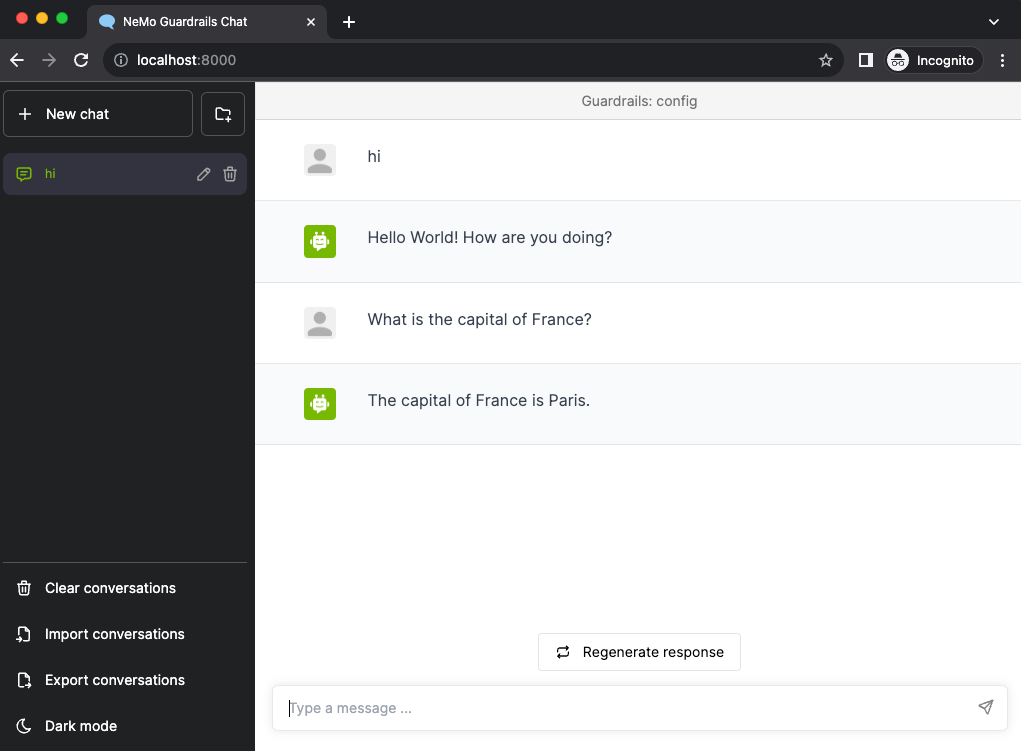
You can also test a guardrails configuration using the NeMo Guardrails server and the Chat UI.
To start the server, run the following command from the root directory of your project (the parent of the config folder):
$ nemoguardrails server --config=./config

INFO:     Started server process [27509]
INFO:     Waiting for application startup.
INFO:     Application startup complete.
INFO:     Uvicorn running on http://0.0.0.0:8000 (Press CTRL+C to quit)
The Chat UI interface is now available at http://localhost:8000:
Next#
Core Colang Concepts explains the Colang concepts messages and flows.
Configuration Reference covers the full set of configuration options, supported model providers, and the available rail types. Reading it next will give you the foundation you need before adding more complex rails.